About PyHARP
We can use a variety of state-of-the-art models within HARP, no coding required. But what if we want to deploy new models to use in our DAW? This is where PyHARP comes in.
HARP Routes Data to and from Gradio Endpoints
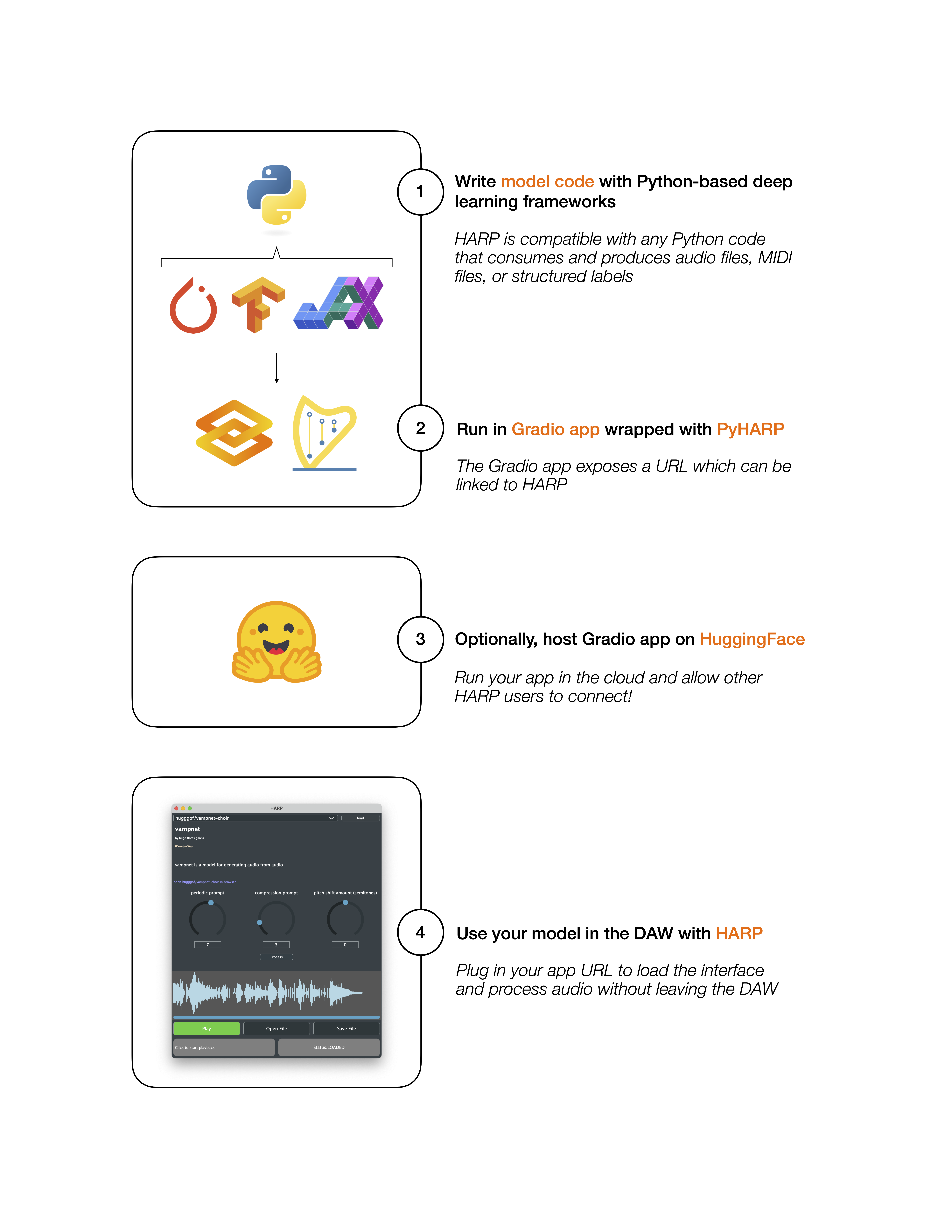
Under the hood, HARP simply routes data (audio, MIDI, etc.) to Python applications for processing and renders the results in the editor. To make this work, we require (1) that these applications are built using Gradio, and (2) that these applications follow a simple set of specifications defined in the PyHARP library. Crucially, PyHARP wraps a number of interactive components from Gradio (e.g. knobs, sliders, text boxes) to allow for rendering application-defined interfaces within the HARP editor.
Within these constraints, developers can build a wide variety of audio and MIDI-processing applications. For instance, HARP is compatible with any Python deep learning framework because it only requires that applications consume and produce audio files, MIDI files, or structrued labels -- it places no limits on how these objects are created or modified.
Host Your Endpoint Locally or in the Cloud
HARP-compatible applications can be run locally or remotely; once running, a URL is exposed and can be entered into the HARP editor to link the application. HARP developers may wish to run applications in the cloud or allow other HARP users to access their applications without spinning up their own copies. One convenient way to do so is through HuggingFace Spaces, which offers hosting for Gradio applications with free and paid options for GPU access. The relationship between HARP, PyHARP, and HuggingFace is illustrated below.